

SimplyNet Heather | March 19, 2026
So you’ve signed up as a SimplyNet customer, received your new modem, and successfully connected – great! But then your Apple device tells you your Wi-Fi security is weak. What does this mean? Do you need to be concerned? Read on for more details.
Your Wi-Fi is probably Perfectly secure
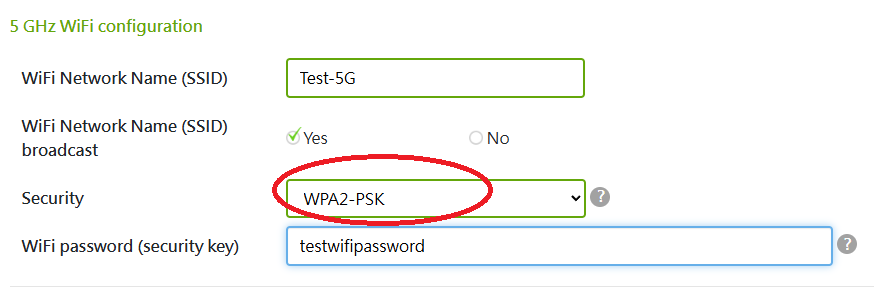
With a SimplyNet rental modem, you will typically receive one of two devices: a CBN CH8568, or a Sercomm DG4244. This message is most commonly seen with the CBNs. However, while these modems are not configured to use the WPA3 protocol, they do use WPA2-PSK (AES). If you were to login to the modem settings, you can confirm this setting for yourself by looking at the configuration page:
So what’s the difference?
While WPA3 is considered stronger for security, and the newest Apple devices prefer it, it can sometimes cause connection issues for older hardware. This makes WPA2 a more stable choice for legacy environments. It is perfectly acceptable and secure, and a strong Wi-Fi password will help to keep you even more secure. If you absolutely must have WPA3, for a specific device that won’t work with WPA2 for example, you can request one of the Sercomm modems. You can also request a bridge modem to be used with your own personal router, allowing you to choose the security level and settings you prefer. Please note that we are unable to help you troubleshoot problems or configure your personal router, however, so this choice would be most appropriate for someone with lots of experience in this area. The bottom line is, you are still very secure with WPA2-PSK, but we can definitely accommodate if WPA3 is needed.
Can i make the message go away?
The short answer is “maybe.” Unfortunately, we are unable to troubleshoot personal devices, (and there’s a lot of different devices out there!) so it’s tough to say. It may be possible to prevent these messages from appearing on your Apple devices, but it will depend on their age and their settings. However, even if the messages might be slightly annoying, you are still secured. Rest assured that you can continue to browse safely, and securely. And if you ever see any other messages that you find concerning and want to put your mind at ease, don’t hesitate to reach out to customer service!
